
Day 5! The end of week 1! 🥳🎊 Holy cow we made it. Thus far we’ve gotten through basic Linux commands, installed some stuff, deleted some stuff, and made a ping sweeper and TODAY we’ll improve it & talk about nmap!
Today’s Objectives
- Improve ping sweeper using if and else command
- Work with nmap!
Ping Sweeper Vol 2.
First let’s take a look at WHY the ping sweeper we just made is the scum of the earth. Say for example you got to sweep something using your script but instead of typing an entire IP you fudge up and just type like … 1 …
Well what ends up happening is you get a whole bunch of addresses starting with 1…it’s insane…lol
So let’s fix that. Because that’s not what we want to happen. We are looking for ENTIRE IP’s not just pieces and parts…take a look at how we do that here…
Let’s add an if else statement !
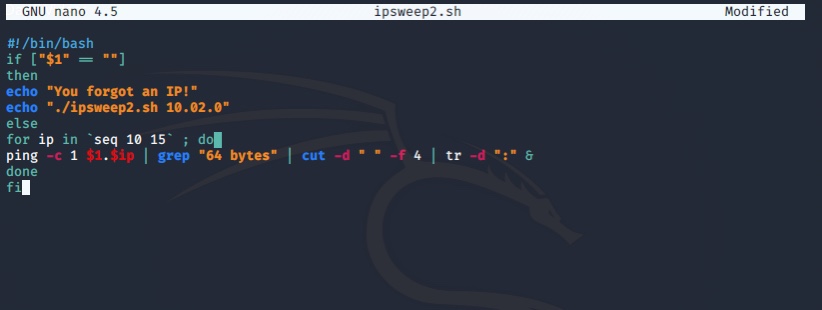
Okay…even still this ping sweeper has its faults but it’s basic. This isn’t something you’d want to use like…for real. It’s not every protective or quiet lol
With that said let’s see how our “fixed” ping sweeper works…what happens if we fudge up? Hopefully with our improvements it’ll stop us before we get there – let’s see …
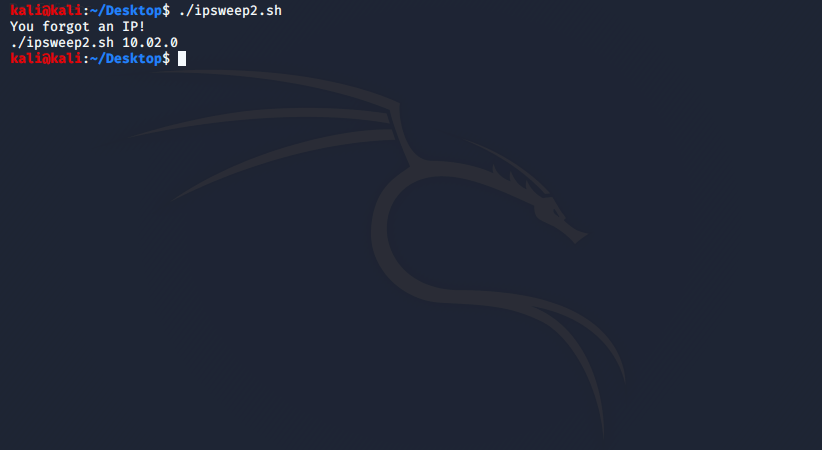
Sweet! It says our syntax is wrong!
Moving on! Lets put it all together now and work with nmap and one-liners.
NMAP TIME!
Alright so we’ve got an iplist2.txt remember…
Now say we want to scan every IP in that list using nmap…how do we do that?
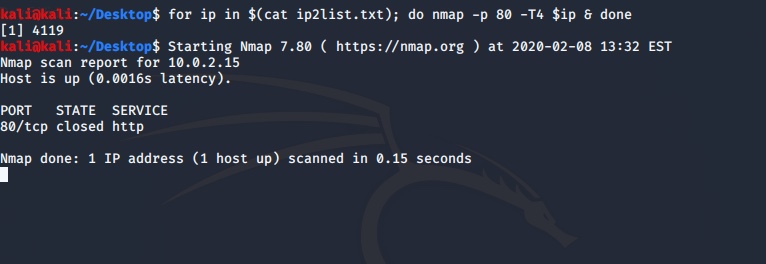
It looks like a lot but it also looks pretty similar to what we did on day 4…once a terminal always a terminal….
I do want to mention a few other commands that you see here and probably a few I forgot yesterday
- $ – is storage. So for example $(cat ip2list.txt) and $ip will give us everything stored in that txt file and all of the ip’s
- do – do what I tell you
- nmap – network mapper
- -p is port
- -T4 (we’ll talk about this later)
Looking closer at the output we can see that port 80 is using TCP and that it is closed!
To Close
That’s it! That’s a wrap on day 5! We made it through week 1. Hot dawg! Next week begins working with Python and homework prior to week 2 includes working on python! Getting super familiar so that’s what I’ll be doing all week 2.
I’ll be using this video to go through Python 3 for an entire 5 days before actually beginning week 2 of the pen-testing course! Which is how my 11 week pen testing course became the 12 wheeler we all know and love! 😂
Day 6 & 7 On python coming at ya Monday! 👩🏽💻
As always … thanks for taking a byte!
Xo, Jazzie
 take a byte